Feature
Scheduling and content calendar
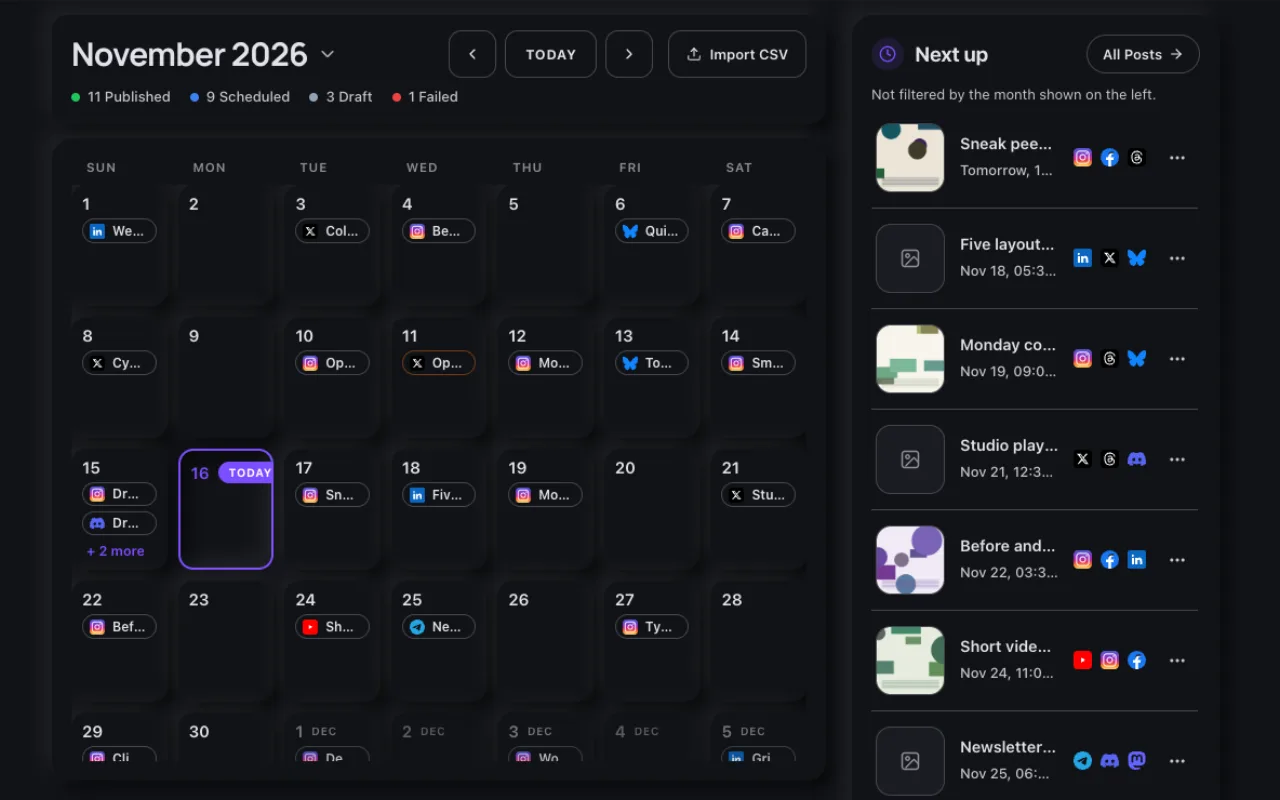
Schedule a post for any future time and MySocials publishes it for you, whether or not you are online. The calendar shows your whole plan in one view.
Published on time, without you
Choose Schedule in the composer and pick a date and time. A scheduler checks for due posts every minute and publishes each one to its platforms, recording the result for every platform.
Your plan on one calendar
- Each day shows its posts with the platforms they go to.
- A count bar shows how many posts are published, scheduled, drafts or failed this month.
- The Next up list shows the upcoming queue, whatever month you are looking at.
- Open a scheduled post to change its text, media, accounts or time before it starts publishing.
Times in your timezone
Scheduled times are shown in your account timezone, and each platform receives the post at that exact moment.
Read the docs
Related
Start with the free plan
Create an account, connect your social profiles and publish your first post on the Free plan.